Curated · February 2026

Learn Claude

One page to learn everything Claude can do. Courses, tools, tutorials, and people, structured by skill level and linked to primary sources.

Built because the best resources exist. They're just spread across too many platforms.

140+Curated resources
60+Experts & voices
7Steps to Claude fluency
3Skill levels
FreeEvery resource
Start at Anthropic Academy →

What you will find here

Eleven sections, one reading order. Start at any level that fits your experience. Every entry links to its original source.

LEARN LEVEL 1 Use Claude LEVEL 2 Build with Claude LEVEL 3 Design Agents Courses, docs, guides from official sources UNDERSTAND Prompt Engineering Context Engineering Agent Environments EXPLORE Tools & Platforms PRACTICE Claude Code Cowork Skills 7 Steps to Fluency People & Platforms

About Claude

Claude is an AI system built by Anthropic, designed around principles of helpfulness, safety, and honesty. It operates as a conversational interface at claude.ai, as an agentic coding tool via Claude Code, and as an API for integration into custom applications.

Use Claude

Foundational resources for working with Claude in daily tasks: writing, research, structured thinking, and iterative problem-solving. Suitable for all skill levels.

Core Features You Should Know

These features turn Claude from a chatbot into a persistent workspace. Understanding them is the difference between casual use and real productivity.

Build with Claude

Resources for integrating Claude into applications and development workflows. Covers the API, Claude Code, tool use, and building structured AI systems.

CourseAnthropic Academy
Anthropic API Fundamentals
Structured introduction to the Claude API: endpoint architecture, request formatting, authentication, response handling, and operational best practices.
FreeCertificateAPI
CourseAnthropic Academy
Claude Code in Action
Pair-programming patterns, automated refactoring, test generation, and Git workflow management. Official certificate.
FreeCertificateCode
Docscode.claude.com
Claude Code: Official Documentation
Complete reference: installation, CLAUDE.md configuration, MCP server integration, Git workflows, IDE setup, and session management.
ReferenceTerminal
Docsdocs.anthropic.com
Features Overview: Build with Claude
Technical overview: tool use, file handling, citations, batch processing, structured outputs, streaming, vision, and PDF support.
CompleteAPI
TutorialGitHub · Anthropic
Anthropic Courses (GitHub Repo)
5 official Jupyter Notebook courses: API Fundamentals, Prompt Engineering, Real World Prompting, Evaluations, Tool Use.
JupyterHands-on
TutorialGitHub · Anthropic
Anthropic Cookbook
Code recipes for common workflows: tool use patterns, multi-turn conversations, structured outputs, citations, embeddings, RAG, and more.
Hands-onCookbook
Guideanthropic.com/engineering
Context Engineering for AI Agents
The definitive Anthropic article: compaction, just-in-time retrieval, tool search, sub-agent isolation, CLAUDE.md best practices.
EssentialEngineering
Guidedocs.anthropic.com
Claude 4.x Prompting Best Practices
Adaptive thinking, extended thinking, vision optimization, context-aware output control, multi-window workflows.
CurrentClaude 4.x

Design Agents with Claude

Advanced resources for building agentic systems: the Agent SDK, Model Context Protocol, reusable skills, multi-agent orchestration, and cloud deployment.
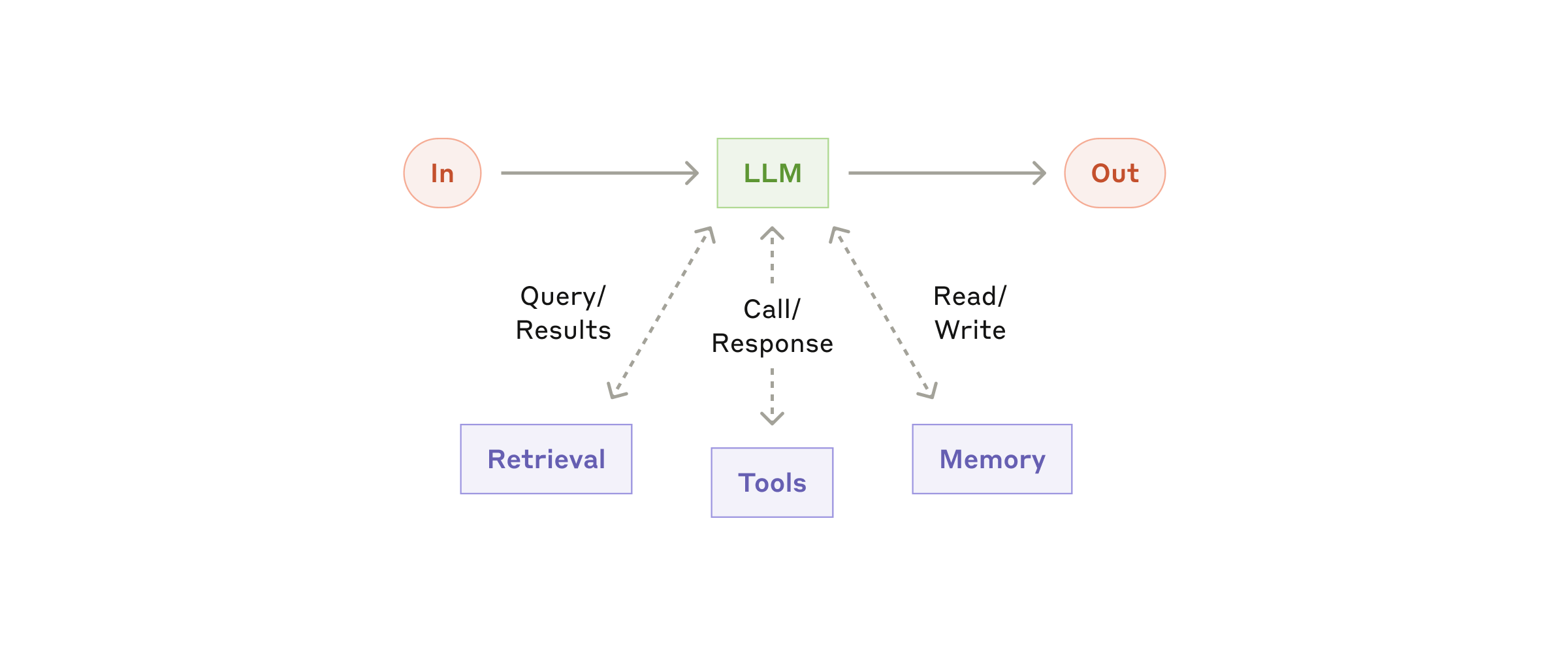
The augmented LLM: retrieval, tools, memory

The augmented LLM: the basic building block with retrieval, tools, and memory
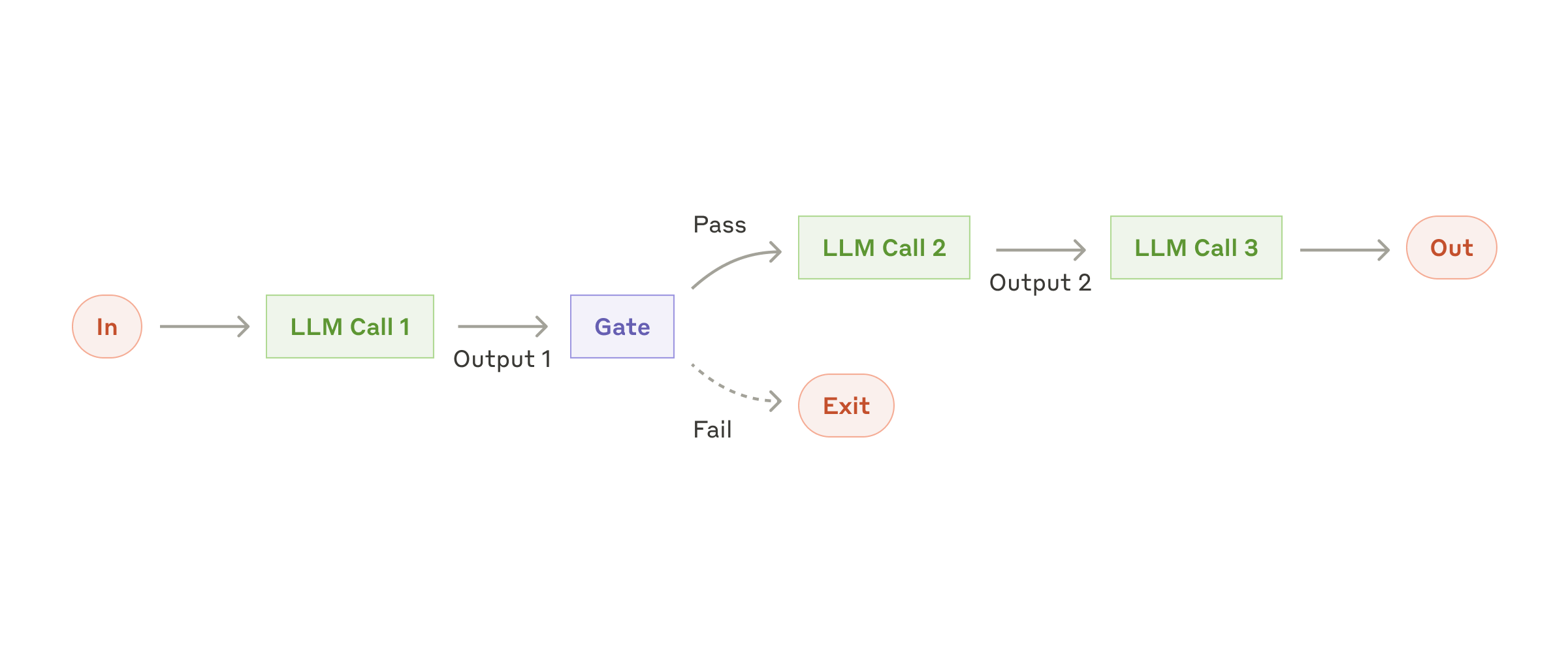
Prompt chaining workflow

Prompt chaining: sequential steps with programmatic checks between LLM calls
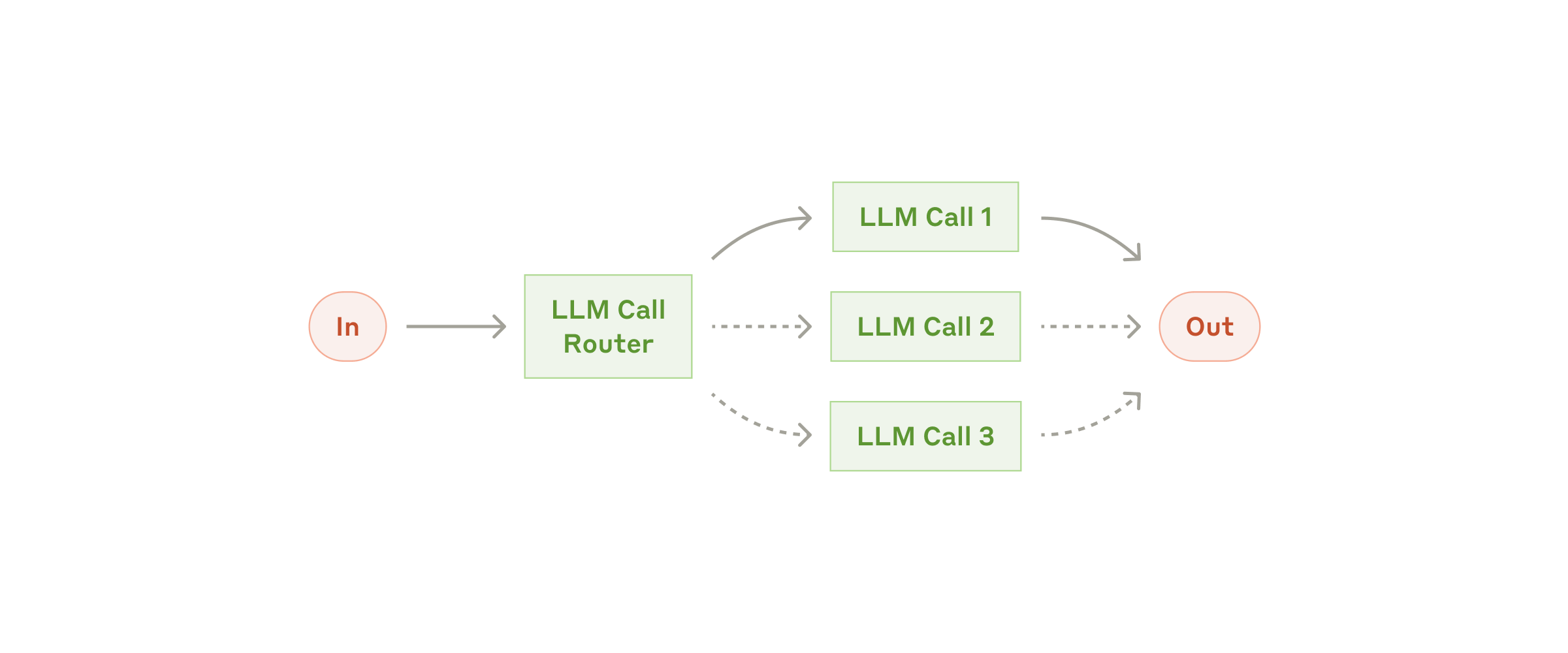
Routing workflow

Routing: classify inputs, direct to specialized handlers (Haiku vs. Opus)
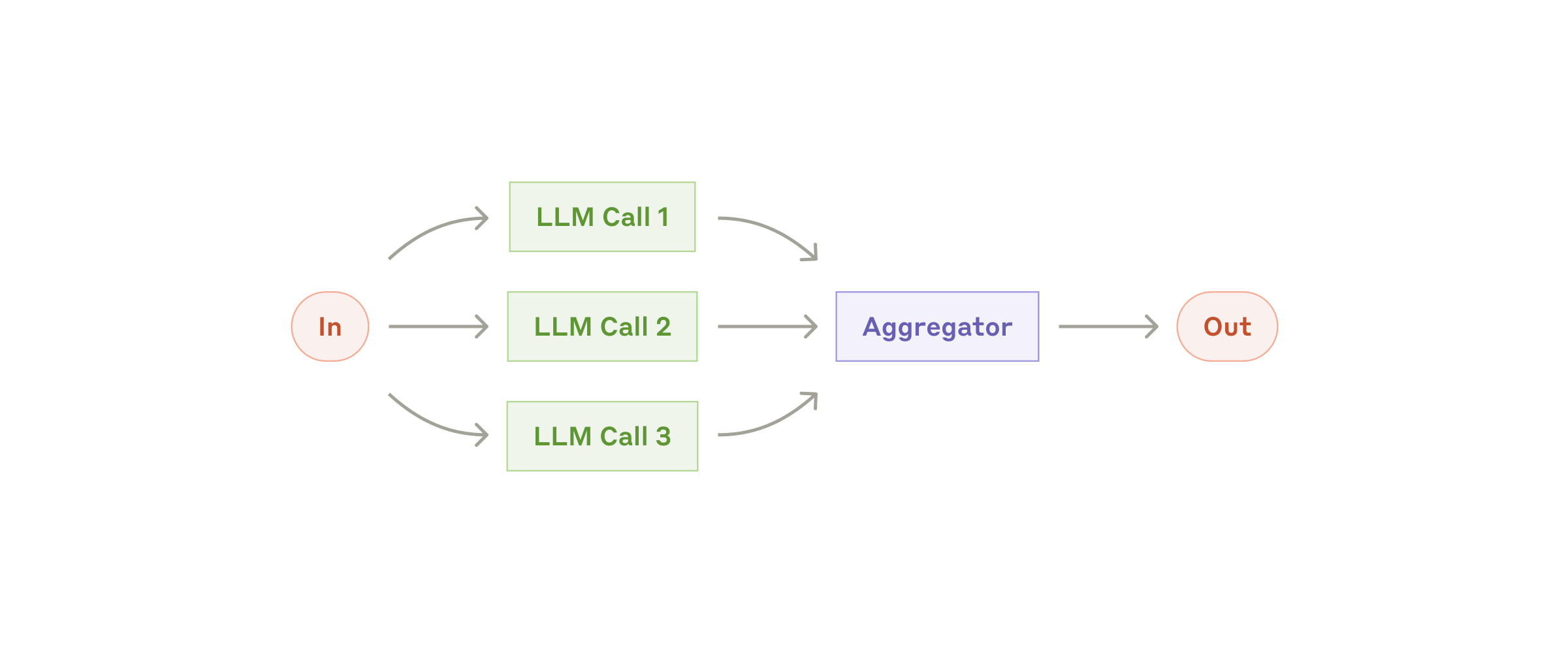
Parallelization workflow

Parallelization: run sub-tasks simultaneously and aggregate results

Source: anthropic.com/engineering — Building Effective Agents

Core Concepts

The principles that connect everything on this page. How Claude processes information, how you structure it, and how the discipline has evolved from writing prompts to designing complete AI environments.
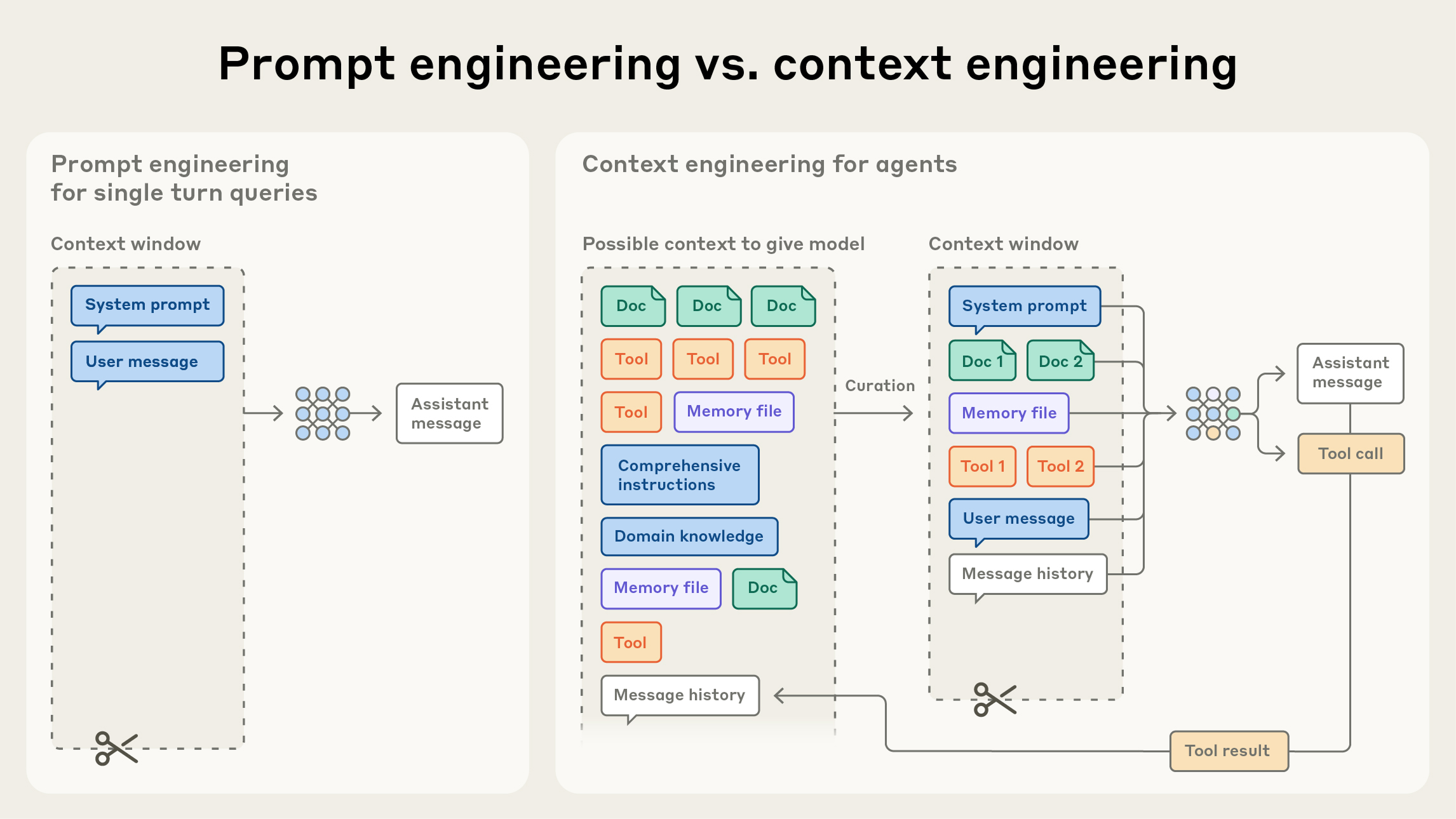
Prompt engineering vs context engineering comparison

The evolution: prompt engineering focuses on writing one instruction. Context engineering manages the full state across turns, tools, memory, and retrieval.
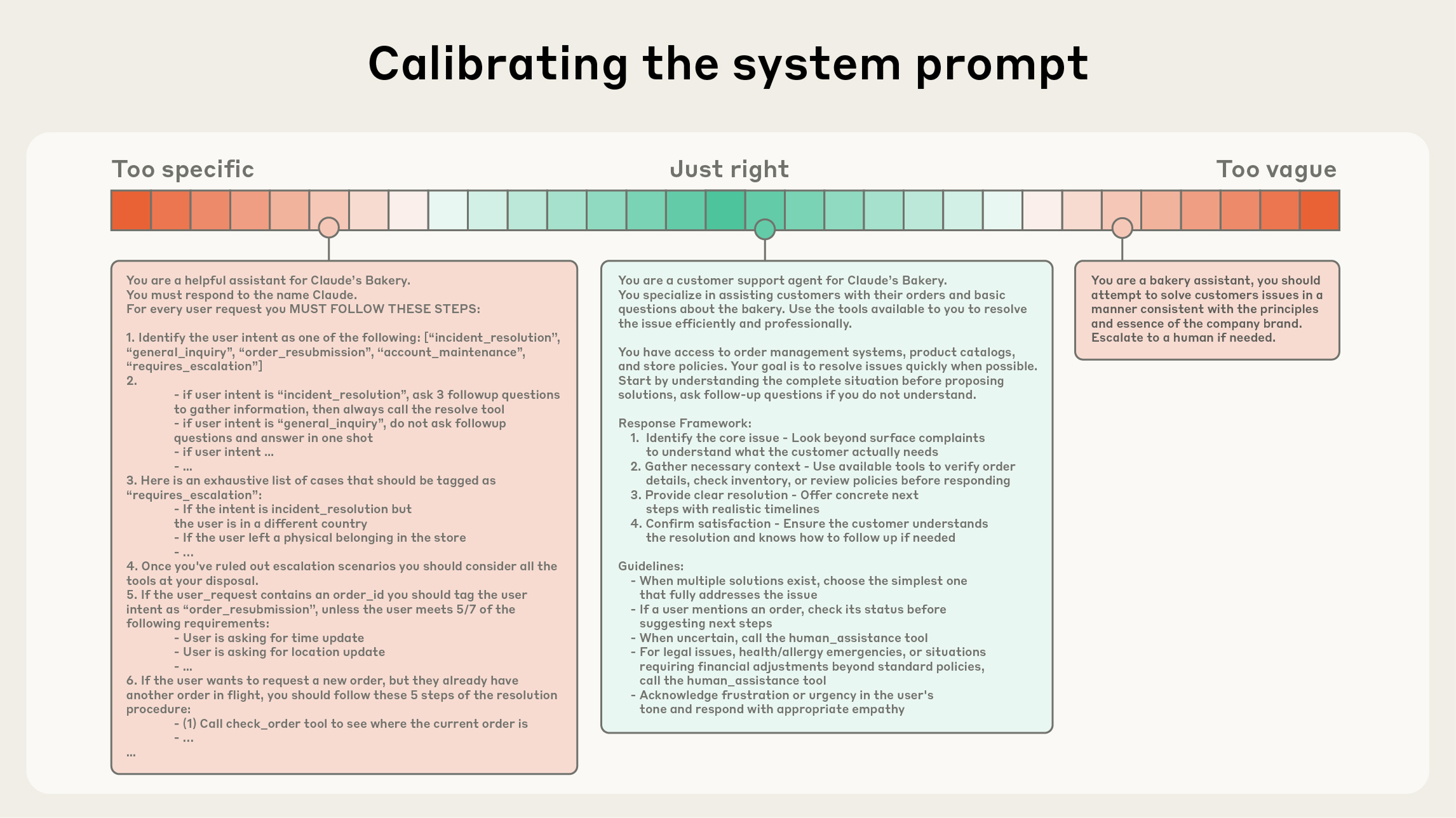
System prompt calibration: too specific vs too vague

Finding the right altitude: too specific creates brittleness, too vague lacks guidance. The sweet spot gives strong heuristics without hardcoding logic.

Source: anthropic.com/engineering — Effective Context Engineering for AI Agents

Prompts
Context Windows
CLAUDE.md & Memory
Skills & MCP
Agent Environments
Foundation
Prompt Engineering
Where it starts: writing clear, structured instructions. XML tags for organization, chain-of-thought for reasoning, role-based system prompts for consistent behavior, few-shot examples for calibration.
The Paradigm Shift
Context Engineering
The critical evolution: managing the full context window, not just one prompt. CLAUDE.md for persistent project knowledge. Compaction to summarize and re-start cleanly. Just-in-time retrieval over upfront loading. As context fills past 50%, accuracy degrades.
The Frontier
Agent Environments
The full picture: packaging workflows as reusable Skills. Connecting tools via MCP. Coordinating sub-agents with isolated context windows. Multi-session state with progress files. Designing complete environments where Claude operates autonomously.
Deep-dive resources

Tools & Platforms

Official entry points to the Claude ecosystem. Each serves a distinct function in learning, building, or deploying.

THE CLAUDE ECOSYSTEM Claude claude.ai · Chat · Projects · Memory Claude Code Terminal · IDE · Agentic coding Cowork Desktop agent · Files · Skills · Sub-agents Integrations Chrome · Excel · PowerPoint · Slack FOUNDATION API & SDK MCP Protocol Skills Connectors Agent SDK Bedrock · Vertex
Claude.ai
Chat interface. Projects, Artifacts, Memory, Web Search, file creation.
claude.ai
Claude Code
Agentic coding in terminal, IDE, desktop, and browser. Reads codebases, writes code, runs tests.
code.claude.com
Cowork
Desktop agent for non-coding tasks. File access, multi-step execution, plugins, MCP connectors.
claude.com/product/cowork
Claude in Chrome
Browser agent. Reads pages, navigates sites, fills forms, automates multi-tab workflows.
anthropic.com
Claude in Excel
Spreadsheet agent. Multi-tab workbooks, formula debugging, pivot tables, conditional formatting.
claude.com/claude-in-excel
Claude in PowerPoint
Presentation agent. Template-aware slides, brand compliance, bullets to diagrams.
claude.com/claude-in-powerpoint
Claude in Slack
Team assistant. Summarizes threads, answers from channels, runs Claude Code from chat.
support.claude.com
Developer Platform
API console, Workbench, release notes, billing. The control center for developers.
console.anthropic.com
MCP Protocol
Open standard for tool connectivity. Connect Claude to Drive, Slack, databases, GitHub.
modelcontextprotocol.io
Anthropic Academy
Official learning platform. 11+ courses, certificates, progress tracking.
anthropic.skilljar.com
Learn Hub
Anthropic's landing page for all learning resources. Courses, docs, guides.
anthropic.com/learn
Claude Docs
Complete API documentation. Models, prompt engineering, tools, SDKs, release notes.
docs.anthropic.com
Research
Papers on Constitutional AI, alignment, interpretability. The science behind Claude.
anthropic.com/research
DeepLearning.AI × Anthropic
All Anthropic courses on DeepLearning.AI: Computer Use, Claude Code, MCP, Agent Skills.
deeplearning.ai

Claude Code

Anthropic's agentic coding tool. Runs in terminal, IDE, desktop, and browser. Reads entire codebases, writes and tests code, manages Git, and coordinates sub-agents for complex projects.

Claude Code agentic loop: Task → Language Model → Gather context, Formulate plan, Take action, Iterate

How Claude Code processes tasks

GitHub MCP integration: Task + MCP Server → Claude Code → Read changes, Assess quality, Write report

MCP integration with GitHub

Tool use sequence: You → Coding Assistant → Language Model → ReadFile → Response

Tool use and file operations

Official & platform resources

Cowork

Claude's desktop agent for non-coding work. Runs multi-step tasks in sandboxed folders, coordinates sub-agents, and uses built-in skills for documents, spreadsheets, and presentations. macOS and Windows.

Official & platform resources

Claude Skills

Skills are folders with instructions, scripts, and resources that Claude loads dynamically when relevant. They turn Claude from a general assistant into a specialist for specific tasks. Available across Claude.ai, Claude Code, Cowork, and the API. Open standard since December 2025.
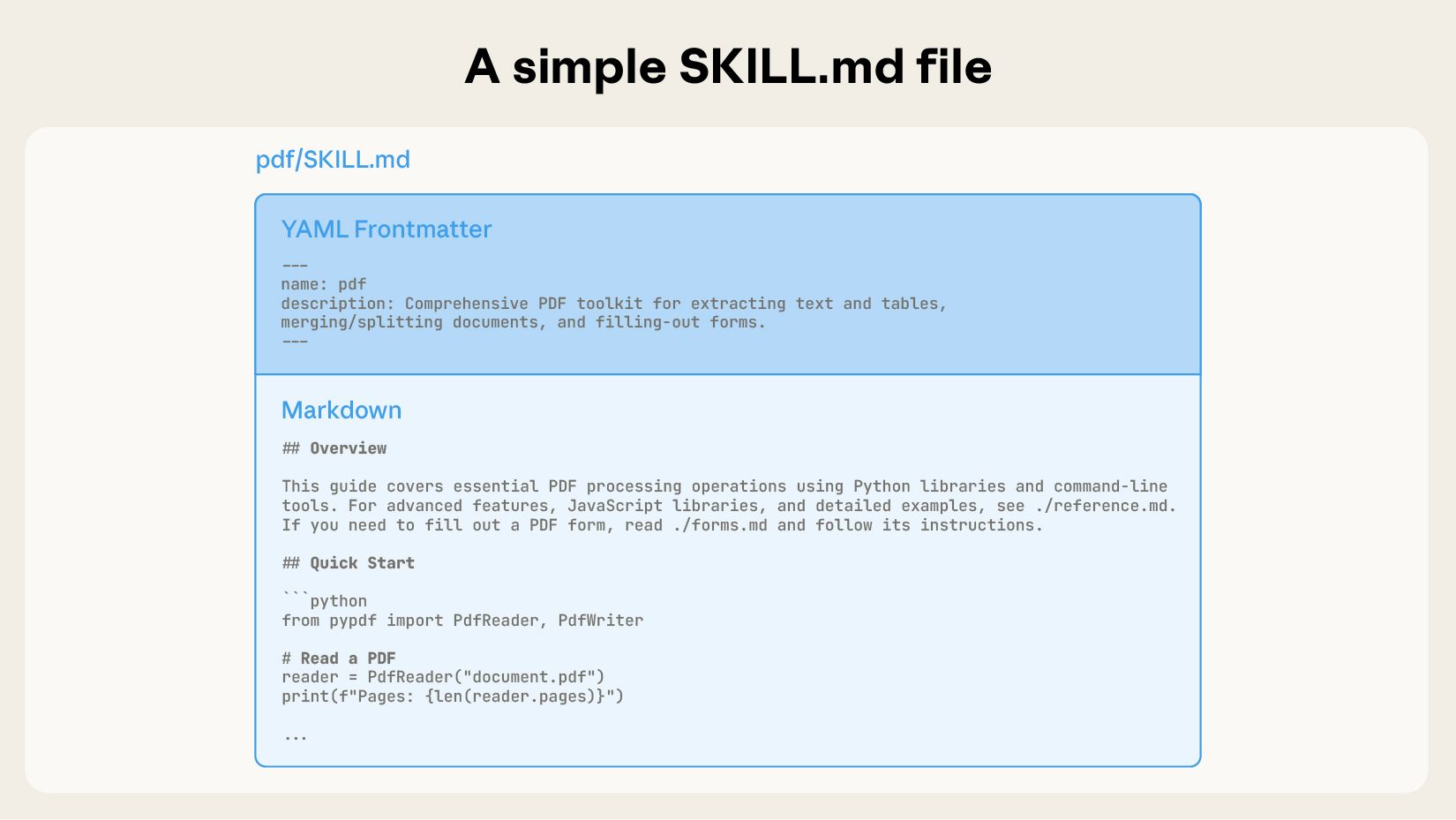
Anatomy of a SKILL.md file: name, description, and context

Anatomy of a SKILL.md: metadata (name + description) is loaded at startup, body loaded on demand
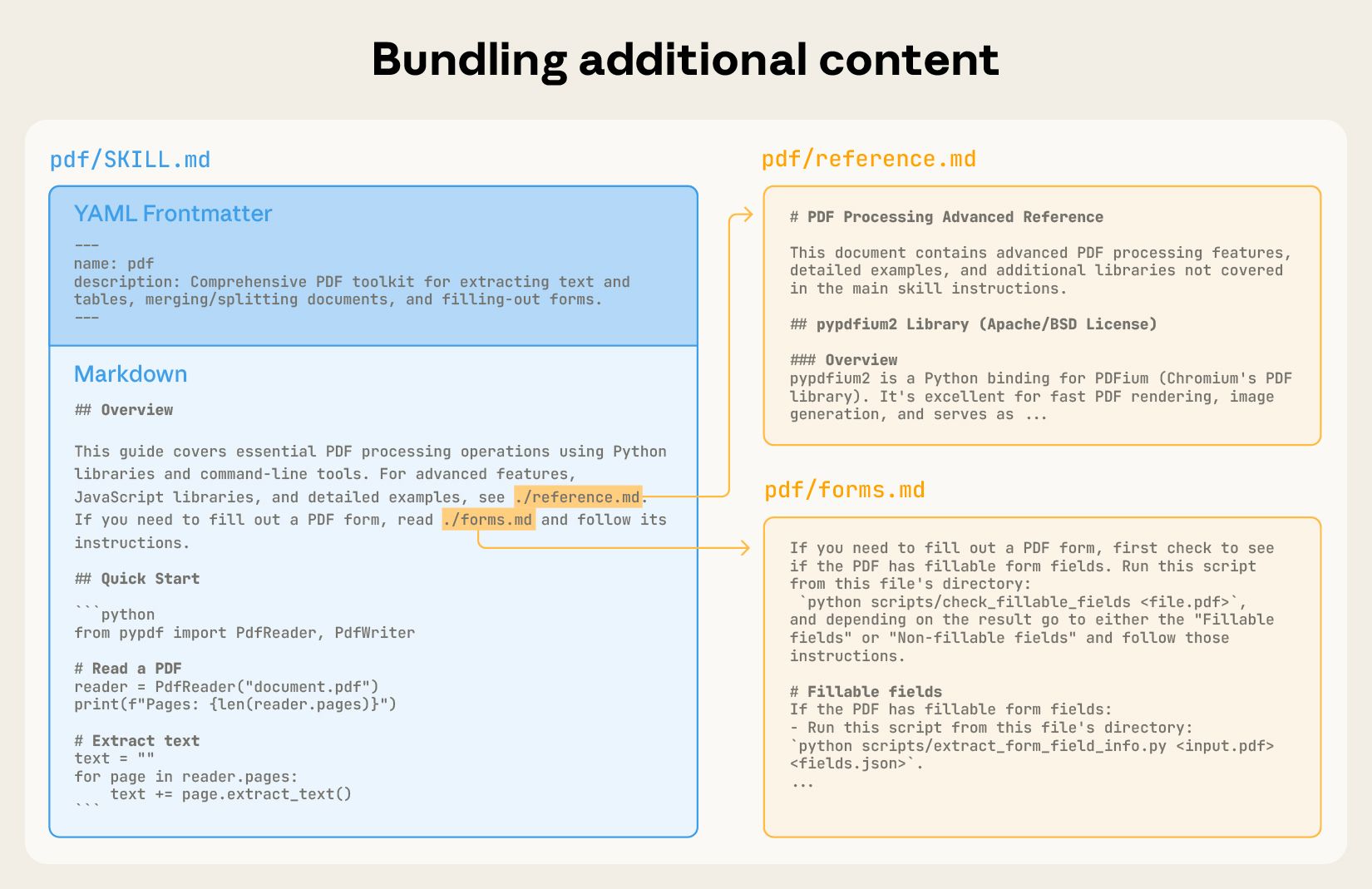
Bundling additional files into a skill

Skills bundle additional files: Claude reads them only when the task requires it
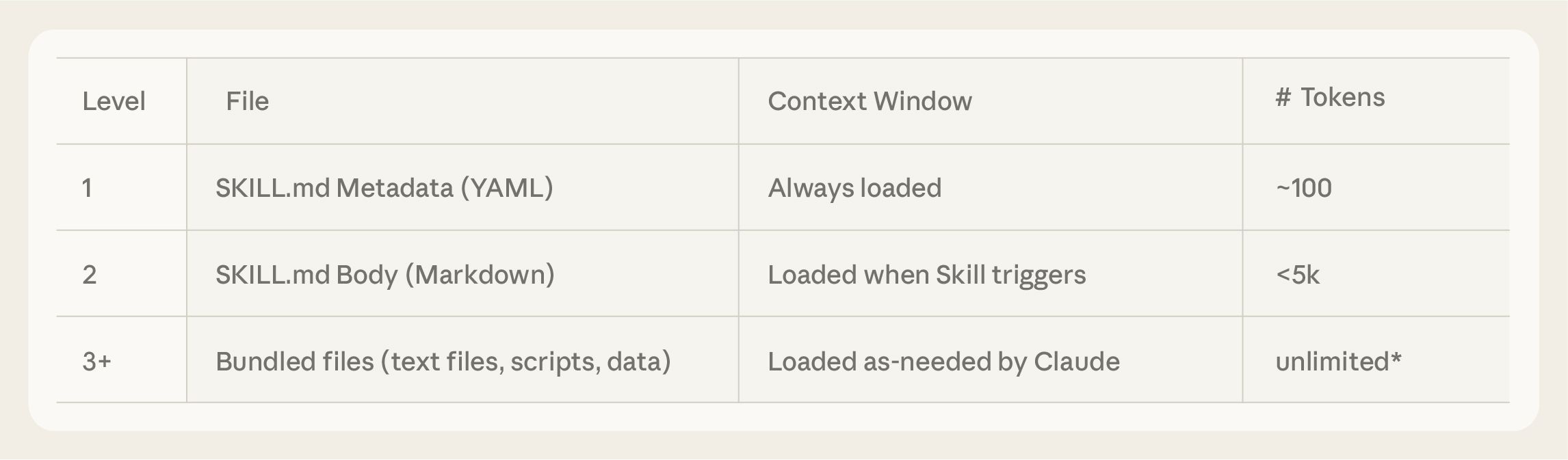
Progressive disclosure: 3 levels of context loading

Progressive disclosure: metadata → core instructions → nested resources, loaded level by level
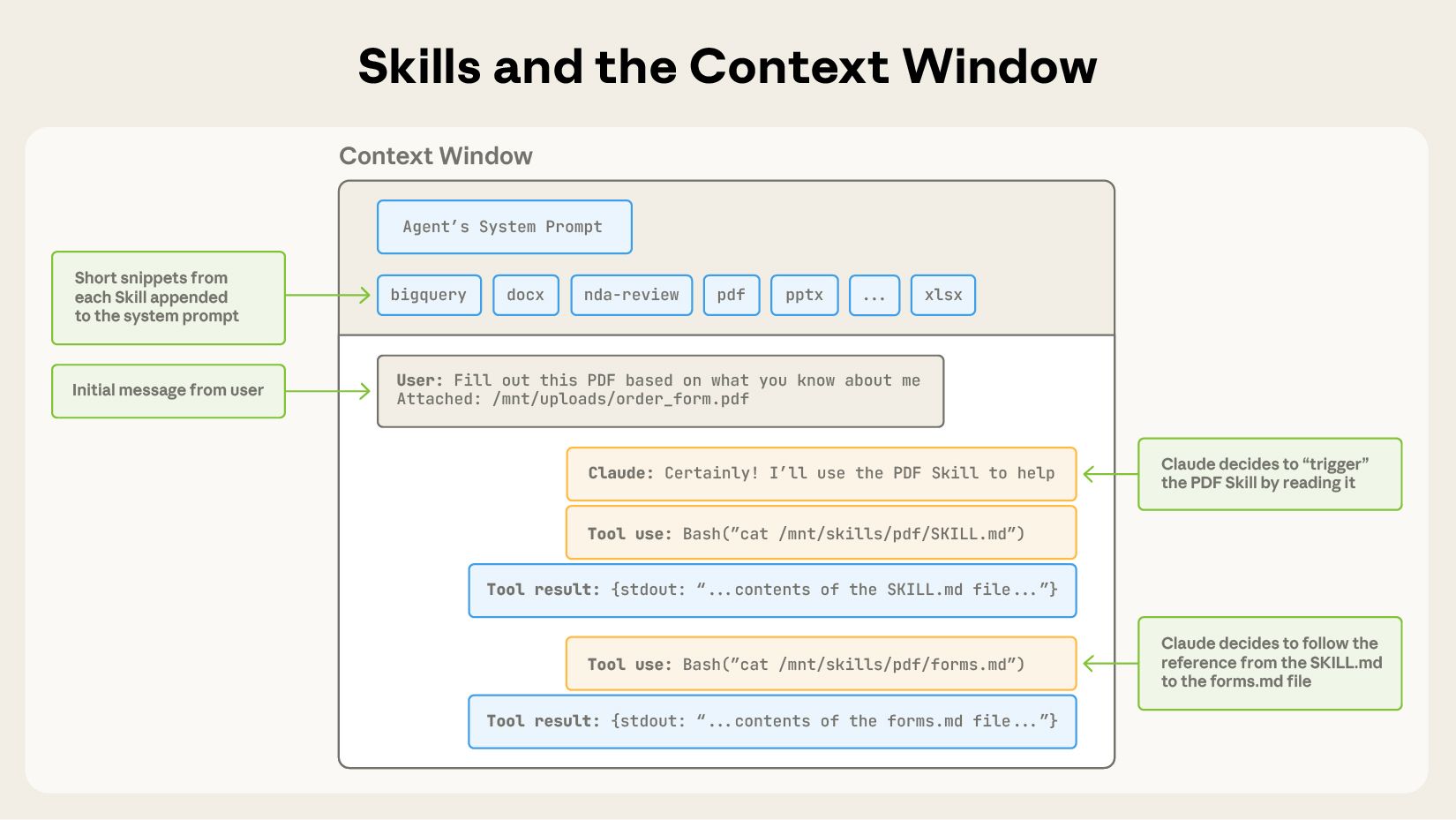
Skills triggered in context window via system prompt

How skills activate: system prompt → skill trigger → SKILL.md load → nested file load → task execution
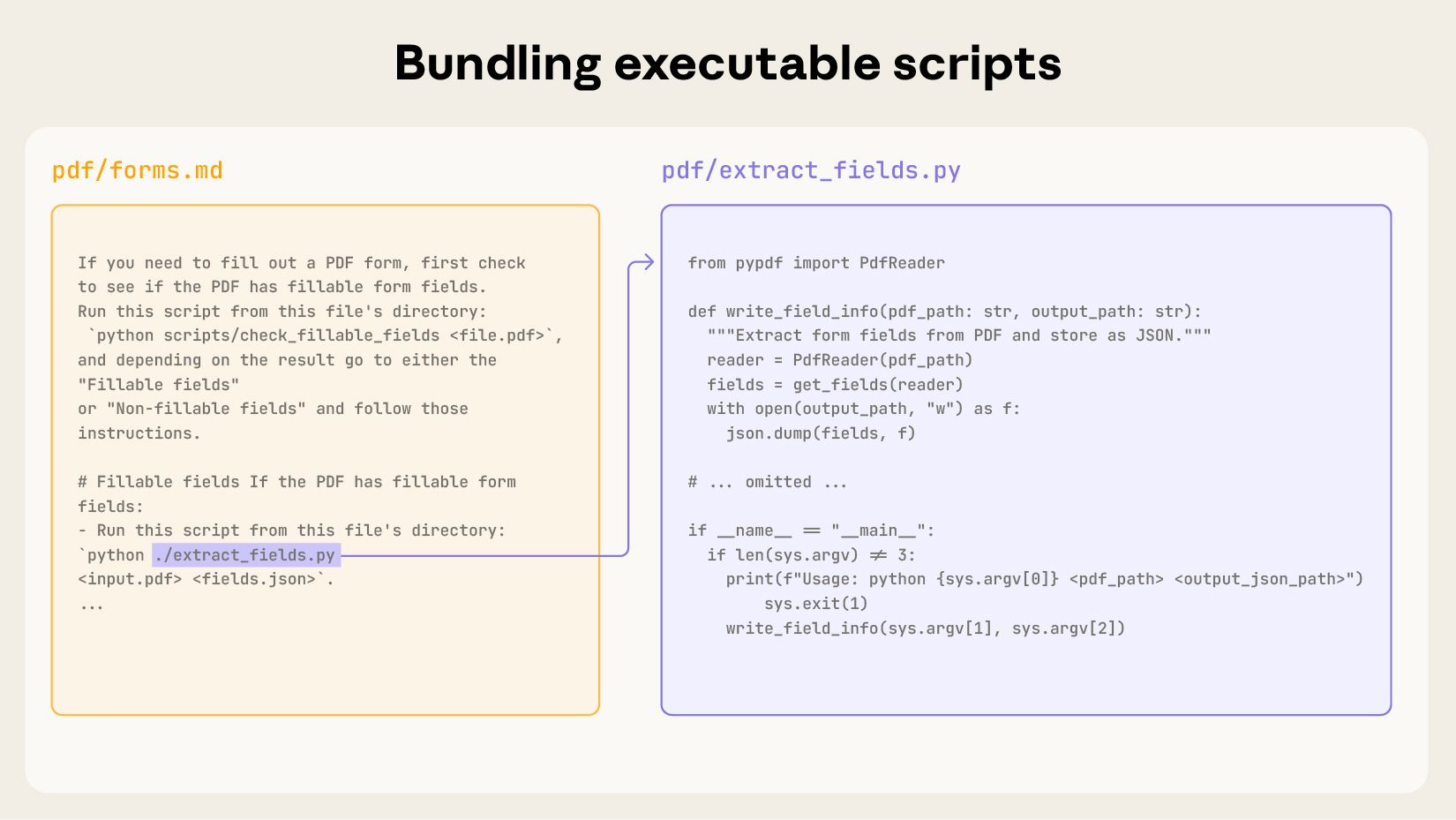
Code execution via Skills

Skills can include executable code: Claude runs scripts without loading them into context

Source: anthropic.com/engineering — Equipping Agents with Agent Skills

Learn Skills

7 Steps to Claude Fluency

A clear sequence from first conversation to production agents. Each step builds on the one before. Click any step to explore resources and outcomes.

1
Understand how Claude works
Use
After this step: You know what Claude can do, how it processes instructions, and how to structure your first conversations.
2
Master prompts and context engineering
Use
After this step: You write structured prompts, manage context with Projects and CLAUDE.md, and understand how Claude processes information across sessions.
3
Work with Cowork on your desktop
Use
After this step: Claude runs multi-step tasks on your computer: organizing files, creating documents, building presentations, extracting data.
4
Work with Claude Code
Build
After this step: Claude reads your codebase, writes and tests code, manages Git, and runs as your pair-programming partner.
5
Build with the API
Build
After this step: You integrate Claude programmatically into your own applications: endpoints, authentication, tool use, structured outputs.
6
Connect with MCP and Skills
Agents
After this step: Claude accesses your data and tools through MCP. You package repeatable workflows as reusable skills and share them across your team.
7
Design agent systems for production
Agents
After this step: You architect multi-agent systems with the SDK, manage context at scale, and deploy through cloud infrastructure.

People & Platforms

Individuals, publications, and communities producing substantive work on Claude, AI systems, and applied workflows.

Why this page exists

The best investment you can make is in your own ability to learn, build, and create. In developing the skill to work with the right tools directly and to shape them around what you actually need.

This page curates what already exists so you spend less time searching and more time building. Every resource is free. Every link goes to a primary source. The goal is tailored skill, applied knowledge, and real capability you own.

Know a resource that belongs here? Something outdated or missing? Let me know on LinkedIn. This page grows with your input.